me @ ur help

Showing posts with label Search engine optimization. Show all posts

Friday, November 19, 2010

My Top 5 SEO Tips


Below are my top 5 tips on SEO, for which I feel have helped my websites the most.

1. Content Content and more Content:
Fresh unique content is king. I built some webpages and then never updated them or changed them and focused on building links. Once I realized my site traffic was dropping off I begun to update the content once again and the site traffic returned. Linkbuilding is important, but so is fresh content, especially for a new website or in a highly competitive market.

2. Link Building
You write all you want and keep it fresh, but you need links to get traffic there. Link exchanges are the best. Its my recommendation to build a "feeder" site or two from a different IP address and exchange links from those sites. Pay special attention to building links within your industry. A link from a car dealership when you are selling SEO doesn't help as mush as a link from an SEO website.

3. Meta Tag Optimization
Make sure your Meta Tags are optimized. There are all kinds of free seo tools out there do this. In fact you can find them on the forum right here. Keep your tags short and simple and pick a few keywords to optimize. This is an easy and quick way to increase search results for your site.

4. Forum Posting
If your here your doing the right thing. Forum posting is a great way to build backlinks, and you just might learn something as well. I post at 5 or 6 different forums a few times a week. Most forums relate to my industry.

5. Blogs
Google loves Blogs. I recommend you build a blog on your website. This is an easy way to add fresh content to your website and is also a way to build good internal links. I also Blog from outside my website (you can use wordpress or blogger) which lets me gain good backlinks from my own postings.

Thursday, November 18, 2010

Miscellaneous information on search engines


At the beginning of 2004, a new and mysterious term appeared among seo specialists – Google SandBox. This is the name of a new Google spam filter that excludes new sites from search results. The work of the SandBox filter results in new sites being absent from search results for virtually any phrase. This even happens with sites that have high-quality unique content and which are promoted using legitimate techniques.

The SandBox is currently applied only to the English segment of the Internet; sites in other languages are not yet affected by this filter. However, this filter may expand its influence. It is assumed that the aim of the SandBox filter is to exclude spam sites – indeed, no search spammer will be able to wait for months until he gets the necessary results. However, many perfectly valid new sites suffer the consequences. So far, there is no precise information as to what the SandBox filter actually is. Here are some assumptions based on practical seo experience:

- SandBox is a filter that is applied to new sites. A new site is put in the sandbox and is kept there for some time until the search engine starts treating it as a normal site.

- SandBox is a filter applied to new inbound links to new sites. There is a fundamental difference between this and the previous assumption: the filter is not based on the age of the site, but on the age of inbound links to the site. In other words, Google treats the site normally but it refuses to acknowledge any inbound links to it unless they have existed for several months. Since such inbound links are one of the main ranking factors, ignoring inbound links is equivalent to the site being absent from search results. It is difficult to say which of these assumptions is true, it is quite possible that they are both true.

- The site may be kept in the sandbox from 3 months to a year or more. It has also been noticed that sites are released from the sandbox in batches. This means that the time sites are kept in the sandbox is not calculated individually for each site, but for groups of sites. All sites created within a certain time period are put into the same group and they are eventually all released at the same time. Thus, individual sites in a group can spend different times in the sandbox depending where they were in the group capture-release cycle.

Typical indications that your site is in the sandbox include:

- Your site is normally indexed by Google and the search robot regularly visits it.
- Your site has a PageRank; the search engine knows about and correctly displays inbound links to your site.
- A search by site address (www.site.com) displays correct results, with the correct title, snippet (resource description), etc.
- Your site is found by rare and unique word combinations present in the text of its pages.
- Your site is not displayed in the first thousand results for any other queries, even for those for which it was initially created. Sometimes, there are exceptions and the site appears among 500-600 positions for some queries. This does not change the sandbox situation, of course.

There no practical ways to bypass the Sandbox filter. There have been some suggestions about how it may be done, but they are no more than suggestions and are of little use to a regular webmaster. The best course of action is to continue seo work on the site content and structure and wait patiently until the sandbox is disabled after which you can expect a dramatic increase in ratings, up to 400-500 positions.


Common search engine principles


To understand seo you need to be aware of the architecture of search engines. They all contain the following main components:

Spider - a browser-like program that downloads web pages.

Crawler – a program that automatically follows all of the links on each web page.

Indexer - a program that analyzes web pages downloaded by the spider and the crawler.

Database– storage for downloaded and processed pages.

Results engine– extracts search results from the database.

Web server – a server that is responsible for interaction between the user and other search engine components.

Specific implementations of search mechanisms may differ. For example, the Spider+Crawler+Indexer component group might be implemented as a single program that downloads web pages, analyzes them and then uses their links to find new resources. However, the components listed are inherent to all search engines and the seo principles are the same.

Spider. This program downloads web pages just like a web browser. The difference is that a browser displays the information presented on each page (text, graphics, etc.) while a spider does not have any visual components and works directly with the underlying HTML code of the page. You may already know that there is an option in standard web browsers to view source HTML code.

Crawler. This program finds all links on each page. Its task is to determine where the spider should go either by evaluating the links or according to a predefined list of addresses. The crawler follows these links and tries to find documents not already known to the search engine.

Indexer. This component parses each page and analyzes the various elements, such as text, headers, structural or stylistic features, special HTML tags, etc.

Database. This is the storage area for the data that the search engine downloads and analyzes. Sometimes it is called the index of the search engine.

Results Engine. The results engine ranks pages. It determines which pages best match a user's query and in what order the pages should be listed. This is done according to the ranking algorithms of the search engine. It follows that page rank is a valuable and interesting property and any seo specialist is most interested in it when trying to improve his site search results. In this article, we will discuss the seo factors that influence page rank in some detail.

Web server. The search engine web server usually contains a HTML page with an input field where the user can specify the search query he or she is interested in. The web server is also responsible for displaying search results to the user in the form of an HTML page.

Wednesday, November 17, 2010

Robots.txt


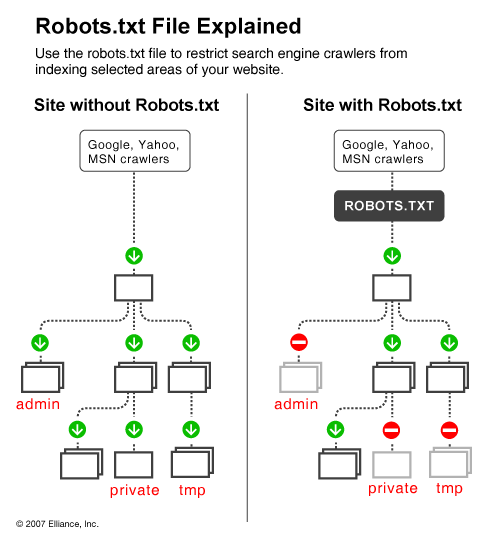
It is great when search engines frequently visit your site and index your content but often there are cases when indexing parts of your online content is not what you want. For instance, if you have two versions of a page (one for viewing in the browser and one for printing), you'd rather have the printing version excluded from crawling, otherwise you risk being imposed a duplicate content penalty. Also, if you happen to have sensitive data on your site that you do not want the world to see, you will also prefer that search engines do not index these pages (although in this case the only sure way for not indexing sensitive data is to keep it offline on a separate machine). Additionally, if you want to save some bandwidth by excluding images, stylesheets and javascript from indexing, you also need a way to tell spiders to keep away from these items.

One way to tell search engines which files and folders on your Web site to avoid is with the use of the Robots metatag. But since not all search engines read metatags, the Robots matatag can simply go unnoticed. A better way to inform search engines about your will is to use a robots.txt file.


Robots.txt is a text (not html) file you put on your site to tell search robots which pages you would like them not to visit. Robots.txt is by no means mandatory for search engines but generally search engines obey what they are asked not to do. It is important to clarify that robots.txt is not a way from preventing search engines from crawling your site and the fact that you put a robots.txt file is something like putting a note “Please, do not enter” on an unlocked door – e.g. you cannot prevent thieves from coming in but the good guys will not open to door and enter. That is why we say that if you have really sen sitive data, it is too naïve to rely on robots.txt to protect it from being indexed and displayed in search results.

The location of robots.txt is very important. It must be in the main directory because otherwise user agents (search engines) will not be able to find it – they do not search the whole site for a file named robots.txt. Instead, they look first in the main directory and if they don't find it there, they simply assume that this site does not have a robots.txt file and therefore they index everything they find along the way. So, if you don't put robots.txt in the right place, do not be surprised that search engines index your whole site.

The concept and structure of robots.txt has been developed more than a decade ago and if you are interested to learn more about it, visit or you can go straight to the Standard for Robot Exclusion because in this article we will deal only with the most important aspects of a robots.txt file. Next we will continue with the structure a robots.txt file.

Structure of a Robots.txt File

The structure of a robots.txt is pretty simple (and barely flexible) – it is an endless list of user agents and disallowed files and directories. Basically, the syntax is as follows:

User-agent:

Disallow:

“User-agent” are search engines' crawlers and disallow: lists the files and directories to be excluded from indexing. In addition to “user-agent:” and “disallow:” entries, you can include comment lines – just put the # sign at the beginning of the line:

# All user agents are disallowed to see the /temp directory.

User-agent: *

Disallow: /temp/

The Traps of a Robots.txt File

when you start making complicated files – i.e. you decide to allow different user agents access to different directories – problems can start, if you do not pay special attention to the traps of a robots.txt file. Common mistakes include typos and contradicting directives. Typos are misspelled user-agents, directories, missing colons after User-agent and Disallow, etc. Typos can be tricky to find but in some cases validation tools help.

The more serious problem is with logical errors. For instance:

User-agent: *

Disallow: /temp/

User-agent: Googlebot

Disallow: /images/

Disallow: /temp/

Disallow: /cgi-bin/

The above example is from a robots.txt that allows all agents to access everything on the site except the /temp directory. Up to here it is fine but later on there is another record that specifies more restrictive terms for Googlebot. When Googlebot starts reading robots.txt, it will see that all user agents (including Googlebot itself) are allowed to all folders except /temp/. This is enough for Googlebot to know, so it will not read the file to the end and will index everything except /temp/ - including /images/ and /cgi-bin/, which you think you have told it not to touch. You see, the structure of a robots.txt file is simple but still serious mistakes can be made easily.

Tools to Generate and Validate a Robots.txt File

Having in mind the simple syntax of a robots.txt file, you can always read it to see if everything is OK but it is much easier to use a validator, like this one: http://tool.motoricerca.info/robots-checker.phtml. These tools report about common mistakes like missing slashes or colons, which if not detected compromise your efforts. For instance, if you have typed:

user agent: *

Disallow: /temp/

this is wrong because there is no slash between “user” and “agent” and the syntax is incorrect.

In those cases, when you have a complex robots.txt file – i.e. you give different instructions to different user agents or you have a long list of directories and subdirectories to exclude, writing the file manually can be a real pain. But do not worry – there are tools that will generate the file for you. What is more, there are visual tools that allow to point and select which files and folders are to be excluded. But even if you do not feel like buying a graphical tool for robots.txt generation, there are online tools to assist you. For instance, the Server-Side Robots Generator offers a dropdown list of user agents and a text box for you to list the files you don't want indexed. Honestly, it is not much of a help, unless you want to set specific rules for different search engines because in any case it is up to you to type the list of directories but is more than nothing.


what are the advantages of SEO Services??


SEO refers to the process of increasing your websites position in the search engines results pages of search engines such as Google, Yahoo and MSN. In today competitive online marketplace, failing to leverage search engines to drive traffic to your website is a big mistake, especially when it is inevitable that your competitors will be doing exactly that. When it comes to deciding how to commit to SEO, some businesses choose to outsource to an SEO company or an SEO consultant however other businesses choose to undergo SEO training as a means of ensuring they have the in-house skills necessary to guide strategy, allot resources and truly represent the long-term goals of their business. Following are reasons why investing in SEO training for your IT or marketing function is better than fully outsourcing SEO to a sub-contractor and leaving your position in the search engines fully in their hands.
Before you start SEO training, you should first understand what SEO is. SEO basically means optimizing the results of a persons search on the web to lead to your website. SEO is a specialized search engine optimization which is a process to increase your website rank against specific keywords or search terms which are used by many visitors on Internet.
Advantages of SEO Services
Most of people on Internet like to use search engines to search of a specific product or service. You product listing should be on top pages in major search engines. You can take services from SEO service providers to achieve specific target. SEO advantages includes targeting traffic, increase brand visibility, increase in sales etc. Keywords optimization plays significant role in making your best choice. SEO is very much cost effective method of marketing. Other advantages of SEO include best usability, browser compatibility and accessibility. Better SEO services will increase in sales and to increase your business services, affiliate business and credibility. SEO services can also increase your confidence and authority as well. Many search engines list websites for free however some of them extra top listings. SEO service providers can help you to get in top listings. If SEO services are implemented effectively then it can increase target traffic to your site and rank your site for long term basis as well. There are many SEO techniques are there and you can choose one best service from them. Any of these methods can be used to rank your website. However an ongoing SEO campaign must be used to get target result from your website.
SEO Major Benefits:
* You can increase daily and unique visitors on your website by offering information related to their needs.
* You can target visitors who are looking for items which are exactly related to your company and increase brand recognition and identity.
* Writing contents which are exactly relevant to your product becomes to increase public exposure.
* To achieve your organization's goals SEO is necessary if you are doing online business.
* It is possible to divide your number of target visitors towards specific products which are highly related to them.
* We can get measurable results using some marketing strategies by making analysis of search engine reports, website statistics and visitor's conversion rates and key indicators.


How to Increase Organic Traffic in site


Use of the Internet and accessing of websites is often referred to as traffic. When one thinks about it, this makes sense, as information is flowing back and forth across Internet roadways much like vehicles are traveling back and forth on conventional roadways. On the web, there are two main types of traffic: paid and organic. Paid traffic is precisely that: payment is made to different sources in order to direct users to a particular website. In other words, a website pays to advertise its URL or domain name.

When you get search traffic naturally from the various search engines it is called organic traffic. This is primarily done by using a technique called SEO. SEO is an acronym for search engine optimization, and there are certain, well-recognized first steps for SEO that will serve to gain you substantial organic traffic from natural searches by humans typing them into the popular engines.

It should be immediately obvious to you why gaining this organic traffic is beneficial to your site. If you want your work recognized or want visitors to your site without having to pay for advertising, the best way and most sustainable method is by the use of the popular search engine optimization steps. They should be put to use in any article, website, or blog you write. If you do not use these methods your success at capturing targeted, organic traffic from the search engines will be limited or nonexistent.

Tips For Getting Organic Traffic

1. Include relevant content, relevant to your page description and Meta keywords.
2. Instead of changing your URL or redirecting from your old URL to your new URL, follow Google's procedure on URL changes to make sure your new site doesn't get skipped, or just avoid URL changes if you can.
3. Don't post duplicate content on your site, so if you quote another page only include a small excerpt and don't repeat your own content on multiple pages.
4. Avoid flash, even though it looks cool, flash and animated banners and intros annoy visitors and search engine bots don't read them.
5. Submit to quality directories.
6. Make sure your robot.txt files are not blocking destination URLs that you do not want blocked.
7. Choose your Meta keywords wisely and include them in your content.
8. Strive to obtain quality links into your site.
9. If you use icon or image links, include a text link.
10. If you operate an affiliate site, make your site a valuable resource, so people chose your site rather than go straight to your affiliate.
11. Add a site map.
12. Don't use link schemes.
13. Write specific content, so searches can find applicable results. Instead of writing "books," write "medical text books" or "organic cookbooks"; be specific.
14. If you include low quality links on your site, block them from being scanned by Googlebot.
15. Don't break up your content too much, like loads of banner ads and so on in the middle or your text, irritates readers and bots.
16. Write unique and compelling content.
17. Don't forget to include your page descriptions.
18. Don't bury text content in images.
19. Look for un-indexed URLs, URL with more than a few parameters or dynamic links, they may be skipped.
20. Stay up-to-date on SEO, your strategies need to constantly evolve.
21. Deliver what you promise, don't drive readers to inapplicable or irrelevant pages.
22. Carefully consider your titles, make sure to include targeted keywords.
23. Don't forget humor or other devices that attract and keep readers.
24. Add text links with anchor links.
25. Keep links out and in up-to-date.
26. Start a blog or forum if it makes sense on your site.
27. Join BBB or your local Chamber of Commerce or other reputable business associations.
28. Submit articles to respectable and active article sites.
29. Add Alt tags to images for people that disable images.
30. Validate and 508 your site for accessibility.
31. Submit your business description to Wikipedia or other popular information sites.
32. Consider adding maps or mashups.
33. Submit to multiple search engines.
34. Consider marketing some of your subpages or articles that have less competition.
35. Don't forget good old-fashion PR.
36. Start a little controversy.
37. Consider adding an RSS feed.
38. Write "top ten" lists, which are popular with article search sites.
39. Build a good site that others want to link to.
40. Eliminate grammar and spelling errors.
41. Publish a privacy policy.
42. Send out press releases when it makes sense.
43. Avoid hidden text and links.
44. Keep your content up-to-date.
45. Don't employ redirects or "cloaking."
46. Don't create pages with bad content, like viruses, trojans, malware and so on.
47. Steer clear of empty, unoriginal affiliate pages.
48. Make sure every page is assessable through at least on static text link.
49. Use text, instead of images to relate important content.
50. Check for broken links.
51. Don't put too many links on one page, even if it is a resource page, keep it well under 100.
52. Test out your site with a text browser.
53. Be leery of badly placed session IDs and arguments.
54. Employ the IF-Modified-Since HTTP header to let Google know if your content has changed.
55. Don't use "&id=" as a URL parameter, they are not indexed.
56. Avoid deceptive or manipulative techniques.

Top 25 seo blog


The Top 25 SEO Blogs list, instead, ranks the blogs according to their Google Pagerank, Alexa rank, number of Bloglines subscribers and Technorati authority. Each factor has a score from 0 to 10, and the maximum score for each blog is 40. Details about the algorithm can be found below the table.

#1Search Engine Land
71091036
#2SEOBook610101036
#3SEO Moz510101035
#4Matt Cutts71081035
#5Search Engine Watch71010734
#6Search Engine Roundtable7108833
#7Search Engine Journal789832
#8Online Marketing Blog6771030
#9Pronet Advertising7751029
#10Marketing Pilgrim786829
#11SEO Chat6104626
#12Search Engine Guide784625
#13SEO Blackhat686525
#14Stuntdubl666624
#15Graywolf’s SEO674724
#16SEO by the SEA645520
#17Link Building Blog555419
#18Jim Boykin564419
#19SEOpedia654419
#20DaveN654419
#21Bruce Clay573318
#22Blue Hat SEO463417
#23Tropical SEO553417
#24SEO Refugee561315
#25Small Business SEM543315


Blogs considered: the list considers only blogs that have a high percentage of SEO-related content. Topics might range from SEO news coverage to general SEO discussion and link building.

Google Pagerank (0 to 10): the actual Pagerank was used on the algorithm.

Alexa Rank (0 to 10): Ranges were determined based on the Alexa Rank (i.e., 100k and up, 80k-100k, 60k-80k, 40k-60k) and each range was assigned a number (1 to 10).

Bloglines Subscribers (0 to 10): Subscriber ranges were determined (i.e., 1-50, 50-100, 100-150, 150-300) and each range was assigned a number (1 to 10).

Technorati Authority (0 to 10): Ranges were determined based on Technorati’s Authority rank (i.e., 1-125, 125-250, 500-750,750-1000) and each range was assigned a number (1 to 10)..

History of SEO


Webmasters and content providers began optimizing sites for search engines in the mid-1990s, as the first search engines were cataloging the early Web. Initially, all webmasters needed to do was submit the address of a page, or URL, to the various engines which would send a "spider" to "crawl" that page, extract links to other pages from it, and return information found on the page to be indexed.
The process involves a search engine spider downloading a page and storing it on the search engine's own server, where a second program, known as an indexer, extracts various information about the page, such as the words it contains and where these are located, as well as any weight for specific words, and all links the page contains, which are then placed into a scheduler for crawling at a later date.
Site owners started to recognize the value of having their sites highly ranked and visible in search engine results, creating an opportunity for both white hat and black hat SEO practitioners. According to industry analyst Danny Sullivan, the phrase "search engine optimization" probably came into use in 1997. The first documented use of the term Search Engine Optimization was John Audette and his company Multimedia Marketing Group as documented by a web page from the MMG site from February, 1997 on the Internet Way Back machine.
Early versions of search algorithms relied on webmaster-provided information such as the keyword meta tag, or index files in engines like ALIWEB. Meta tags provide a guide to each page's content. Using meta data to index pages was found to be less than reliable, however, because the webmaster's choice of keywords in the meta tag could potentially be an inaccurate representation of the site's actual content. Inaccurate, incomplete, and inconsistent data in meta tags could and did cause pages to rank for irrelevant searches. Web content providers also manipulated a number of attributes within the HTML source of a page in an attempt to rank well in search engines.
By relying so much on factors such as keyword density which were exclusively within a webmaster's control, early search engines suffered from abuse and ranking manipulation. To provide better results to their users, search engines had to adapt to ensure their results pages showed the most relevant search results, rather than unrelated pages stuffed with numerous keywords by unscrupulous webmasters. Since the success and popularity of a search engine is determined by its ability to produce the most relevant results to any given search, allowing those results to be false would turn users to find other search sources. Search engines responded by developing more complex ranking algorithms, taking into account additional factors that were more difficult for webmasters to manipulate.
Graduate students at Stanford University, Larry Page and Sergey Brin, developed "backrub," a search engine that relied on a mathematical algorithm to rate the prominence of web pages. The number calculated by the algorithm, PageRank, is a function of the quantity and strength of inbound links. PageRank estimates the likelihood that a given page will be reached by a web user who randomly surfs the web, and follows links from one page to another. In effect, this means that some links are stronger than others, as a higher PageRank page is more likely to be reached by the random surfer.
Page and Brin founded Google in 1998. Google attracted a loyal following among the growing number of Internet users, who liked its simple design. Off-page factors were considered as well as on-page factors (such as keyword frequency, meta tags, headings, links and site structure) to enable Google to avoid the kind of manipulation seen in search engines that only considered on-page factors for their rankings. Although PageRank was more difficult to game, webmasters had already developed link building tools and schemes to influence the Inktomi search engine, and these methods proved similarly applicable to gaming PageRank. Many sites focused on exchanging, buying, and selling links, often on a massive scale. Some of these schemes, or link farms, involved the creation of thousands of sites for the sole purpose of link spamming.
By 2004, search engines had incorporated a wide range of undisclosed factors in their ranking algorithms to reduce the impact of link manipulation. Google says it ranks sites using more than 200 different signals.The leading search engines, Google and Yahoo, do not disclose the algorithms they use to rank pages. Notable SEO service providers, such as Rand Fishkin, Barry Schwartz, Aaron Wall and Jill Whalen, have studied different approaches to search engine optimization, and have published their opinions in online forums and blogs. SEO practitioners may also study patents held by various search engines to gain insight into the algorithms.
In 2005 Google began personalizing search results for each user. Depending on their history of previous searches, Google crafted results for logged in users. In 2008, Bruce Clay said that "ranking is dead" because of personalized search. It would become meaningless to discuss how a website ranked, because its rank would potentially be different for each user and each search.
In 2007 Google announced a campaign against paid links that transfer PageRank. On June 15, 2009, Google disclosed that they had taken measures to mitigate the effects of PageRank sculpting by use of the nofollow attribute on links. Matt Cutts, a well-known software engineer at Google, announced that Google Bot would no longer treat nofollowed links in the same way, in order to prevent SEO service providers from using nofollow for PageRank sculpting. As a result of this change the usage of nofollow leads to evaporation of pagerank. In order to avoid the above, SEO engineers developed alternative techniques that replace nofollowed tags with obfuscated Javascript and thus permit PageRank sculpting. Additionally several solutions have been suggested that include the usage of iframes, Flash and Javascript.
In December 2009 Google announced it would be using the web search history of all its users in order to populate search results.
Real-time-search was introduced in late 2009 in an attempt to make search results more timely and relevant. Historically site administrators have spent months or even years optimizing a website to increase search rankings. With the growth in popularity of social media sites and blogs the leading engines made changes to their algorithms to allow fresh content to rank quickly within the search results. This new approach to search places importance on current, fresh and unique content.

what is simply SEO means???


Many may be not knowing actually what is SEO..simply it is search engine optimization,let me tel u in detail...

Search engine optimization is the process of improving the visibility of a website or a web page in search engines via the "natural" or un-paid search results. Other forms of search engine marketing (SEM) target paid listings. In general, the earlier , and more frequently a site appears in the search results list, the more visitors it will receive from the search engine. SEO may target different kinds of search, including image search, local search, video search and industry-specific vertical search engines. This gives a website web presence.

As an Internet marketing strategy, SEO considers how search engines work and what people search for. Optimizing a website may involve editing its content and HTML and associated coding to both increase its relevance to specific keywords and to remove barriers to the indexing activities of search engines. Promoting a site to increase the number of back links, or inbound links, is another SEO tactic.

The acronym "SEO" can refer to "search engine optimizers," a term adopted by an industry of consultants who carry out optimization projects on behalf of clients, and by employees who perform SEO services in-house. Search engine optimizers may offer SEO as a stand-alone service or as a part of a broader marketing campaign. Because effective SEO may require changes to the HTML source code of a site and site content, SEO tactics may be incorporated into website development and design. The term "search engine friendly" may be used to describe website designs, menus, content management systems, images, videos, shopping carts, and other elements that have been optimized for the purpose of search engine exposure.

Another class of techniques, known as black hat SEO or spamdexing, uses methods such as link farms, keyword stuffing and article spinning that degrade both the relevance of search results and the user-experience of search engines. Search engines look for sites that employ these techniques in order to remove them from their indices.