me @ ur help

Showing posts with label seo consultant. Show all posts

Friday, November 19, 2010

My Top 5 SEO Tips


Below are my top 5 tips on SEO, for which I feel have helped my websites the most.

1. Content Content and more Content:
Fresh unique content is king. I built some webpages and then never updated them or changed them and focused on building links. Once I realized my site traffic was dropping off I begun to update the content once again and the site traffic returned. Linkbuilding is important, but so is fresh content, especially for a new website or in a highly competitive market.

2. Link Building
You write all you want and keep it fresh, but you need links to get traffic there. Link exchanges are the best. Its my recommendation to build a "feeder" site or two from a different IP address and exchange links from those sites. Pay special attention to building links within your industry. A link from a car dealership when you are selling SEO doesn't help as mush as a link from an SEO website.

3. Meta Tag Optimization
Make sure your Meta Tags are optimized. There are all kinds of free seo tools out there do this. In fact you can find them on the forum right here. Keep your tags short and simple and pick a few keywords to optimize. This is an easy and quick way to increase search results for your site.

4. Forum Posting
If your here your doing the right thing. Forum posting is a great way to build backlinks, and you just might learn something as well. I post at 5 or 6 different forums a few times a week. Most forums relate to my industry.

5. Blogs
Google loves Blogs. I recommend you build a blog on your website. This is an easy way to add fresh content to your website and is also a way to build good internal links. I also Blog from outside my website (you can use wordpress or blogger) which lets me gain good backlinks from my own postings.

Wednesday, November 17, 2010

Robots.txt


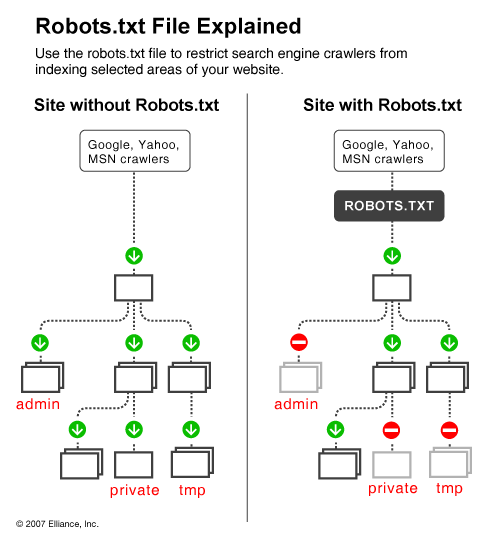
It is great when search engines frequently visit your site and index your content but often there are cases when indexing parts of your online content is not what you want. For instance, if you have two versions of a page (one for viewing in the browser and one for printing), you'd rather have the printing version excluded from crawling, otherwise you risk being imposed a duplicate content penalty. Also, if you happen to have sensitive data on your site that you do not want the world to see, you will also prefer that search engines do not index these pages (although in this case the only sure way for not indexing sensitive data is to keep it offline on a separate machine). Additionally, if you want to save some bandwidth by excluding images, stylesheets and javascript from indexing, you also need a way to tell spiders to keep away from these items.

One way to tell search engines which files and folders on your Web site to avoid is with the use of the Robots metatag. But since not all search engines read metatags, the Robots matatag can simply go unnoticed. A better way to inform search engines about your will is to use a robots.txt file.


Robots.txt is a text (not html) file you put on your site to tell search robots which pages you would like them not to visit. Robots.txt is by no means mandatory for search engines but generally search engines obey what they are asked not to do. It is important to clarify that robots.txt is not a way from preventing search engines from crawling your site and the fact that you put a robots.txt file is something like putting a note “Please, do not enter” on an unlocked door – e.g. you cannot prevent thieves from coming in but the good guys will not open to door and enter. That is why we say that if you have really sen sitive data, it is too naïve to rely on robots.txt to protect it from being indexed and displayed in search results.

The location of robots.txt is very important. It must be in the main directory because otherwise user agents (search engines) will not be able to find it – they do not search the whole site for a file named robots.txt. Instead, they look first in the main directory and if they don't find it there, they simply assume that this site does not have a robots.txt file and therefore they index everything they find along the way. So, if you don't put robots.txt in the right place, do not be surprised that search engines index your whole site.

The concept and structure of robots.txt has been developed more than a decade ago and if you are interested to learn more about it, visit or you can go straight to the Standard for Robot Exclusion because in this article we will deal only with the most important aspects of a robots.txt file. Next we will continue with the structure a robots.txt file.

Structure of a Robots.txt File

The structure of a robots.txt is pretty simple (and barely flexible) – it is an endless list of user agents and disallowed files and directories. Basically, the syntax is as follows:

User-agent:

Disallow:

“User-agent” are search engines' crawlers and disallow: lists the files and directories to be excluded from indexing. In addition to “user-agent:” and “disallow:” entries, you can include comment lines – just put the # sign at the beginning of the line:

# All user agents are disallowed to see the /temp directory.

User-agent: *

Disallow: /temp/

The Traps of a Robots.txt File

when you start making complicated files – i.e. you decide to allow different user agents access to different directories – problems can start, if you do not pay special attention to the traps of a robots.txt file. Common mistakes include typos and contradicting directives. Typos are misspelled user-agents, directories, missing colons after User-agent and Disallow, etc. Typos can be tricky to find but in some cases validation tools help.

The more serious problem is with logical errors. For instance:

User-agent: *

Disallow: /temp/

User-agent: Googlebot

Disallow: /images/

Disallow: /temp/

Disallow: /cgi-bin/

The above example is from a robots.txt that allows all agents to access everything on the site except the /temp directory. Up to here it is fine but later on there is another record that specifies more restrictive terms for Googlebot. When Googlebot starts reading robots.txt, it will see that all user agents (including Googlebot itself) are allowed to all folders except /temp/. This is enough for Googlebot to know, so it will not read the file to the end and will index everything except /temp/ - including /images/ and /cgi-bin/, which you think you have told it not to touch. You see, the structure of a robots.txt file is simple but still serious mistakes can be made easily.

Tools to Generate and Validate a Robots.txt File

Having in mind the simple syntax of a robots.txt file, you can always read it to see if everything is OK but it is much easier to use a validator, like this one: http://tool.motoricerca.info/robots-checker.phtml. These tools report about common mistakes like missing slashes or colons, which if not detected compromise your efforts. For instance, if you have typed:

user agent: *

Disallow: /temp/

this is wrong because there is no slash between “user” and “agent” and the syntax is incorrect.

In those cases, when you have a complex robots.txt file – i.e. you give different instructions to different user agents or you have a long list of directories and subdirectories to exclude, writing the file manually can be a real pain. But do not worry – there are tools that will generate the file for you. What is more, there are visual tools that allow to point and select which files and folders are to be excluded. But even if you do not feel like buying a graphical tool for robots.txt generation, there are online tools to assist you. For instance, the Server-Side Robots Generator offers a dropdown list of user agents and a text box for you to list the files you don't want indexed. Honestly, it is not much of a help, unless you want to set specific rules for different search engines because in any case it is up to you to type the list of directories but is more than nothing.


SEO Basics on Page Optimization


It takes more than just good content to get your website ranked well by search engines. Your site has probably not ranked well enough till now only because your site was not very “understandable” to the search engines. Let’s say there has been a communication gap in between the two. However, it is not an irreversible state… this is a very common problem and can easily be corrected with some ‘On-page Optimization’

1. Start with keyword research
What is keyword research? Keyword research is the practice of finding relevant search terms and phrases that people use in conducting searches online and determining the keywords most suited to your website.
So let’s start with your site, since your website targets used car buyers, what words would they type in the search engine? Note down your keywords. It probably includes ‘Buy used cars’, ‘Used cars on sale’, ‘Price of used cars’ etc.
After compiling a list of probable keywords/phrases that your target audience might use in the search engines, you can go one step further & use some great keyword research tools available online.

Every website’s coding structure is divided in to two parts: a Head and a Body. If you are thinking that I am going to teach you coding and programming, I’m not! Rather, I am just going to explain how you can tweak certain elements in each of these sections to your advantage:
The Invisible Portion
The HEAD is like a cover page of a book which gives direct information about its content. The HEAD consists of multiple tags with the Title and Meta tags being the more important ones.
• Title: The title is what appears on the top of your browser, giving brief information about the page. The title is important because the search engines use it to determine the theme & context of the site, the same way we read the title of a book to know what it’s about. For instance, if you had concluded from your keyword research that the terms ‘Used cars’ & ‘Buy used cars’ would be your target terms, your title could perhaps be ‘Buy Used Cars at Low Prices: 1000s of Used Cars for Sale’, rather than an indirect title like ‘We offer the best rides’. However, don’t overuse the keyword, we have used the terms ‘Used cars’ just twice & in proper context. A combination of keywords put together like ‘Used cars, buy cars, sell cars’ could be considered spammy.Another reason why you wouldn’t want to stuff your title with just keywords & make it user friendly is because the title is what is displayed by the search engines when showing your site in the search results.

• Meta tags:
a. Meta keywords is a tag that is no longer considered as important by the search engines but it is still considered good practice to optimize. It’s a tag which contains a list of your target key terms for that page. E.g.
b. Meta description is a brief snippet about the contents of the page that could be used by the search engine when displaying your site details in the search results. If you do not give a meta description, you have no control over what the search engines will display when showing your results.

The BODY in html consists of everything that is visible to people who open your website. Think of it like the actual content of a book with many pages. There are multiple elements in the BODY which you would want to consider tweaking.
• Headings: Heading tags (H1, H2 tags) are used to label your headline and are considered important information by search engines. Search engines assume that headings give an idea about the theme of the page and are thought to be given slightly more importance than the page content itself. It should be carefully chosen and injected with relevant keywords.
• Content: You want to make sure you include the right keywords in the contents of your page. You want to ensure you include similar words and phrases through out the content while ensuring it’s not overdone. Again, if your page targets “used cars”, you might want to distribute the keywords “used cars” through out the page while at the same time also including other similar keywords like “old cars” and “second sale cars”. Using similar keywords through out also helps. Although it’s very important to remember that while writing your content, you want to first focus on writing for your end user and making the content most appealing to them. Only once that objective is achieved, then you can try incorporating these changes in your content to suit the the search engines while ensuring you’re not compromising on the quality of the content.
Some of us also get so caught up in making our site attractive, forgetting that search engines cannot read Flash animations. So if you want to have a Flash based website, you want to make sure you also include a non-flash version for the search engines to read (some of your users as well might prefer viewing a non-flash version).

Optimizing your Internal Linking Structure: Internal linking allows users to navigate to other sections of your website. Internal linking plays a crucial role in page ranking. Use relevant anchor text, with keywords of course, to link to other pages of your website, but only if it’s relevant.
For example, if your website is offering offers on select models, you can include, “More cars for sale” instead of, “To avail offers go to: www.usedcars.com”. Clicking on ‘cars for sale’ will take them directly to the page.
• Do not leave images unattributed: Search engines can read only text, not images. By using alt attribute in your image tags, you can describe images with text, letting search engines detect images which are otherwise left ignored. When an internet user looks for images on search engines like Google image search, only websites that have textual descriptions of images will show up. For example: if you have a picture of an Audi, make sure you enter the name ‘Audi’ for the picture. The search engines might not be able to view the picture, but they will know that you have a picture of an Audi in your site through the tag.
• URLs should be informative to search engines: Uniform Resource Locator is the unique address used to locate documents on the World Wide Web. Keywords in page URL helps it to get noticed by search engines. Each page of your site has a different address called URL. For example, the URL for your website may be www.usedcars.com and the URL for its web page can be www.usedcars.com/porche/carrera.html. Avoid using random text and numbers like www.usedcars.com/wrqew11/022vds.html. This doesn’t tell search engines anything about the contents of the page. Short URLs often work best, but if it is not possible, use relevant words separated with hyphens (‘-‘).
• Stop being inactive: Update your website regularly with unique content. Don’t just update content, but keep adding more pages to your website. Search engines are looking for fresh, updated information and changes are being made by the minute on the internet.
Common mistakes you can avoid:
Now, don’t think you know how to do on-page optimization by reading the above mentioned points. You don’t want to be one of the many whose fall is caused by ignorance, no no! There are many mistakes that people make while doing on-page optimization. I have listed them below for your benefit… so that you do not make the same mistakes.
1. No space for copycats: Copying content from other websites is a no-no. It’s not only unethical but search engines can detect content duplication in a jiffy and filter it out, bringing your ranking down. Websites like www.copyscape.com help to track copied content.
2. No cheating: Hiding text using the same color as the background or placing them behind images are old tricks. You can fool visitors but not search engines. Avoid keyword stuffing, as mentioned earlier.
You probably didn’t realize that the changes you would need to make would be this simple. On-page optimization can take you a long way in getting noticed by the search engines. So if you have not implemented these changes already, do it now! You can thank me later when the search engines keep coming back to your site!


what are the advantages of SEO Services??


SEO refers to the process of increasing your websites position in the search engines results pages of search engines such as Google, Yahoo and MSN. In today competitive online marketplace, failing to leverage search engines to drive traffic to your website is a big mistake, especially when it is inevitable that your competitors will be doing exactly that. When it comes to deciding how to commit to SEO, some businesses choose to outsource to an SEO company or an SEO consultant however other businesses choose to undergo SEO training as a means of ensuring they have the in-house skills necessary to guide strategy, allot resources and truly represent the long-term goals of their business. Following are reasons why investing in SEO training for your IT or marketing function is better than fully outsourcing SEO to a sub-contractor and leaving your position in the search engines fully in their hands.
Before you start SEO training, you should first understand what SEO is. SEO basically means optimizing the results of a persons search on the web to lead to your website. SEO is a specialized search engine optimization which is a process to increase your website rank against specific keywords or search terms which are used by many visitors on Internet.
Advantages of SEO Services
Most of people on Internet like to use search engines to search of a specific product or service. You product listing should be on top pages in major search engines. You can take services from SEO service providers to achieve specific target. SEO advantages includes targeting traffic, increase brand visibility, increase in sales etc. Keywords optimization plays significant role in making your best choice. SEO is very much cost effective method of marketing. Other advantages of SEO include best usability, browser compatibility and accessibility. Better SEO services will increase in sales and to increase your business services, affiliate business and credibility. SEO services can also increase your confidence and authority as well. Many search engines list websites for free however some of them extra top listings. SEO service providers can help you to get in top listings. If SEO services are implemented effectively then it can increase target traffic to your site and rank your site for long term basis as well. There are many SEO techniques are there and you can choose one best service from them. Any of these methods can be used to rank your website. However an ongoing SEO campaign must be used to get target result from your website.
SEO Major Benefits:
* You can increase daily and unique visitors on your website by offering information related to their needs.
* You can target visitors who are looking for items which are exactly related to your company and increase brand recognition and identity.
* Writing contents which are exactly relevant to your product becomes to increase public exposure.
* To achieve your organization's goals SEO is necessary if you are doing online business.
* It is possible to divide your number of target visitors towards specific products which are highly related to them.
* We can get measurable results using some marketing strategies by making analysis of search engine reports, website statistics and visitor's conversion rates and key indicators.


How to Increase Organic Traffic in site


Use of the Internet and accessing of websites is often referred to as traffic. When one thinks about it, this makes sense, as information is flowing back and forth across Internet roadways much like vehicles are traveling back and forth on conventional roadways. On the web, there are two main types of traffic: paid and organic. Paid traffic is precisely that: payment is made to different sources in order to direct users to a particular website. In other words, a website pays to advertise its URL or domain name.

When you get search traffic naturally from the various search engines it is called organic traffic. This is primarily done by using a technique called SEO. SEO is an acronym for search engine optimization, and there are certain, well-recognized first steps for SEO that will serve to gain you substantial organic traffic from natural searches by humans typing them into the popular engines.

It should be immediately obvious to you why gaining this organic traffic is beneficial to your site. If you want your work recognized or want visitors to your site without having to pay for advertising, the best way and most sustainable method is by the use of the popular search engine optimization steps. They should be put to use in any article, website, or blog you write. If you do not use these methods your success at capturing targeted, organic traffic from the search engines will be limited or nonexistent.

Tips For Getting Organic Traffic

1. Include relevant content, relevant to your page description and Meta keywords.
2. Instead of changing your URL or redirecting from your old URL to your new URL, follow Google's procedure on URL changes to make sure your new site doesn't get skipped, or just avoid URL changes if you can.
3. Don't post duplicate content on your site, so if you quote another page only include a small excerpt and don't repeat your own content on multiple pages.
4. Avoid flash, even though it looks cool, flash and animated banners and intros annoy visitors and search engine bots don't read them.
5. Submit to quality directories.
6. Make sure your robot.txt files are not blocking destination URLs that you do not want blocked.
7. Choose your Meta keywords wisely and include them in your content.
8. Strive to obtain quality links into your site.
9. If you use icon or image links, include a text link.
10. If you operate an affiliate site, make your site a valuable resource, so people chose your site rather than go straight to your affiliate.
11. Add a site map.
12. Don't use link schemes.
13. Write specific content, so searches can find applicable results. Instead of writing "books," write "medical text books" or "organic cookbooks"; be specific.
14. If you include low quality links on your site, block them from being scanned by Googlebot.
15. Don't break up your content too much, like loads of banner ads and so on in the middle or your text, irritates readers and bots.
16. Write unique and compelling content.
17. Don't forget to include your page descriptions.
18. Don't bury text content in images.
19. Look for un-indexed URLs, URL with more than a few parameters or dynamic links, they may be skipped.
20. Stay up-to-date on SEO, your strategies need to constantly evolve.
21. Deliver what you promise, don't drive readers to inapplicable or irrelevant pages.
22. Carefully consider your titles, make sure to include targeted keywords.
23. Don't forget humor or other devices that attract and keep readers.
24. Add text links with anchor links.
25. Keep links out and in up-to-date.
26. Start a blog or forum if it makes sense on your site.
27. Join BBB or your local Chamber of Commerce or other reputable business associations.
28. Submit articles to respectable and active article sites.
29. Add Alt tags to images for people that disable images.
30. Validate and 508 your site for accessibility.
31. Submit your business description to Wikipedia or other popular information sites.
32. Consider adding maps or mashups.
33. Submit to multiple search engines.
34. Consider marketing some of your subpages or articles that have less competition.
35. Don't forget good old-fashion PR.
36. Start a little controversy.
37. Consider adding an RSS feed.
38. Write "top ten" lists, which are popular with article search sites.
39. Build a good site that others want to link to.
40. Eliminate grammar and spelling errors.
41. Publish a privacy policy.
42. Send out press releases when it makes sense.
43. Avoid hidden text and links.
44. Keep your content up-to-date.
45. Don't employ redirects or "cloaking."
46. Don't create pages with bad content, like viruses, trojans, malware and so on.
47. Steer clear of empty, unoriginal affiliate pages.
48. Make sure every page is assessable through at least on static text link.
49. Use text, instead of images to relate important content.
50. Check for broken links.
51. Don't put too many links on one page, even if it is a resource page, keep it well under 100.
52. Test out your site with a text browser.
53. Be leery of badly placed session IDs and arguments.
54. Employ the IF-Modified-Since HTTP header to let Google know if your content has changed.
55. Don't use "&id=" as a URL parameter, they are not indexed.
56. Avoid deceptive or manipulative techniques.