me @ ur help

Showing posts with label seo. Show all posts

Thursday, January 6, 2011

On page optimization

What is on page optimization?
On-page optimisation (on-page SEO) is what can be done on the pages of a website to maximise its performance in the search engines for target keywords related to the on-page content.
On page optimization is one of the very first step of SEO which every webmaster should look into. It probably won’t even take you an hour to learn and implement some of these on-page optimization techniques. But you may ask me, why it is so important? – Well literally speaking, if you can do proper on-page optimization for your website you can not only rank well in a search engine but also can increase the overall readability of your website for your visitors

What are the different methods in on page optimization?
Keyword Research and Analysis
Page Specific Meta Tag Creation
Title Tag (Page Title Optimisation)
Alt Tag Optimization
Anchor Text Optimization
Content Placement
Keyword Density
Implementation of 301 Permanent Redirect
Implementation of Google Analytics
Search Engine Verification from Google, Yahoo and MSN
Submission of XML Sitemap
Creation of Proper Link Structure
Creation and Submission of ROR.xml
Optimization of Search Engine Essential Files (robots.txt, urllist.txt, sitemap.xml)

SEO EXPERT IN INDIA

Sunday, November 21, 2010

Android sweeps Apple, BlackBerry in US market

There is more bad news for BlackBerry maker Research In Motion (RIM) as its smartphone sales have slipped to the third position in the US market.
According to the latest data by the NPD Group, the US-based smartphone market tracking company, the BlackBerry's share of the US market in the third quarter fell to 22 percent from 28 percent in the second quarter.
On the other hand, the sales of Apple's devices rose marginally to 23 percent from 22 percent in the second quarter, pushing the BlackBerry maker to the third spot in the US smartphone market.
The steep fall in sales of the BlackBerry maker, which until recently dominated the US market, came despite the high-profile launch of the BlackBerry Torch 9800 in August.
But it was not Apple, but the surge in the popularity of Google's Android operating system (OS) which did the most damage to RIM in the US market.
The sales of Google Android devices jumped as much as 11 percent from the second quarter to account for 44 percent of all smartphones purchased in the third quarter.
"Much of Android's quarterly share growth came at the expense of RIM, rather than Apple,'' Ross Rubin, executive director of industry analysis at the NPD Group, said.
"The HTC EVO 4G, Motorola Droid X, and other new high-end Android devices have been gaining momentum at carriers that traditionally have been strong RIM distributors, and the recent introduction of the BlackBerry Torch has done little to stem the tide,'' he said.
According to the data, Android's operating system has made such an impact on the market that the share of RIM OS has declined by 53 percent, and that of Apple iOS has fallen by 21 percent since 2009.
Because of this onslaught from Android OS, "Apple faces challenges in further expanding its domestic market share, while still retaining exclusivity," said Rubin.
Just two weeks ago, Apple CEO Steve JObs had taunted RIM, saying,"we have now passed RIM, and I don't see them catching up with us in the foreseeable feature."
But it is Android OS that is becoming the major worry for him and BlackBerry bosses.

Saturday, November 20, 2010

Blekko search engine with a human touch


A small Silicon Valley company with some big name backers has released a test version of a new search engine that the company says has a key ingredient that is missing from Google, the human touch.
According to Blekko, the Web has increasingly become saturated with spam-like websites, specially designed to pop up in Google's search results but whose content is heavier on marketing pitches than substantive information.
The remedy, Blekko Chief Executive Rich Skrenta told Reuters, is to narrow searches to groups of websites that people, not computers, have pre-approved as being the best sources of information for particular topics.
The approach is decidedly old-school in an industry where computer algorithms developed by engineers at Google and Microsoft Corp have for years been considered the ideal way to find information in the sea of online data.
Blekko has raised $ 24 million in funding as it has developed its product over the past three years, with angel investors including Marc Andreessen, the creator of the first Web browser, and Ron Conway, who has invested in tech companies including Twitter, Foursquare and even Google.
Blekko joins a long list of search engines that have tried to improve upon Google's business, with a less-than-stellar track record. Cuil, a high-profile search engine launched by former Google employees in 2008, quietly shut down in September; Powerset, a search engine that let people ask questions in plain English, was acquired by Microsoft in 2008.
Greg Sterling, an Internet consultant and a contributing editor for the online blog Search Engine Land, said he doesn't expect that Blekko will displace Google any time soon. But he said the company has developed a creative approach to search that might become popular as a secondary search engine for certain types of queries.
In an emailed statement, Google said that it welcomes competition that helps users get useful information and gives people new choices. "Having great competitors is a huge benefit to us and everyone in the search space-it makes us all work harder, and at the end of the day everyone benefits from that," said Google.
Blekko is launching with a special directory of websites that can provide spam-free results in seven general search categories: health, recipes, song lyrics, hotels, automobiles, colleges and personal finance.
Blekko also allows users to create their own personal directories of websites for any topic, so that the search engine only looks for information from sources the user deems relevant or trustworthy.
The focus on quality websites over quantity has appeal, said Sterling. "We don't care if there are 30 million results or 40 million results, it's really 'Give me the information I need in an efficient way so I don't have to go wading through all this nonsense'," he said.

Friday, November 19, 2010

Facebook mail


Facebook CEO Mark Zuckerberg says the newly launched Facebook messaging system will soon replace the regular mail.
"We spent lot of time building a handful of products to fit what we think the need is in a modern messaging system," said Zuckerberg in his fresh attack on rival Google.
So what is the difference between the newly launched Facebook messaging system and the good old Gmail?
The new Facebook system unifies all your conversations that happen through e-mails, Facebook messages, SMS, other chat clients and puts them as a thread on your new @facebook.com email address.
Your e-mail username will be similar to your profile name and you will be able to send your emails from within your Facebook page.
Facebook's 'Social Inbox'; much like Gmail's 'priority inbox' will sort your personal messages and prioritising notes from Facebook friends. All other messages go in a second inbox. You will be allowed to move people from one folder to other.
Facebook has about 500 million users so this product is a direct threat to Gmail's 170 million users and Yahoo!'s 303 million users.
The new feature is already being rolled out in the US but might take a while to reach your inbox. And you will have to sign up for this service at .
So should you switch from your e-mail to this? Considering Facebook's track record on privacy maybe you should wait and watch.

Thursday, November 18, 2010

Miscellaneous information on search engines


At the beginning of 2004, a new and mysterious term appeared among seo specialists – Google SandBox. This is the name of a new Google spam filter that excludes new sites from search results. The work of the SandBox filter results in new sites being absent from search results for virtually any phrase. This even happens with sites that have high-quality unique content and which are promoted using legitimate techniques.

The SandBox is currently applied only to the English segment of the Internet; sites in other languages are not yet affected by this filter. However, this filter may expand its influence. It is assumed that the aim of the SandBox filter is to exclude spam sites – indeed, no search spammer will be able to wait for months until he gets the necessary results. However, many perfectly valid new sites suffer the consequences. So far, there is no precise information as to what the SandBox filter actually is. Here are some assumptions based on practical seo experience:

- SandBox is a filter that is applied to new sites. A new site is put in the sandbox and is kept there for some time until the search engine starts treating it as a normal site.

- SandBox is a filter applied to new inbound links to new sites. There is a fundamental difference between this and the previous assumption: the filter is not based on the age of the site, but on the age of inbound links to the site. In other words, Google treats the site normally but it refuses to acknowledge any inbound links to it unless they have existed for several months. Since such inbound links are one of the main ranking factors, ignoring inbound links is equivalent to the site being absent from search results. It is difficult to say which of these assumptions is true, it is quite possible that they are both true.

- The site may be kept in the sandbox from 3 months to a year or more. It has also been noticed that sites are released from the sandbox in batches. This means that the time sites are kept in the sandbox is not calculated individually for each site, but for groups of sites. All sites created within a certain time period are put into the same group and they are eventually all released at the same time. Thus, individual sites in a group can spend different times in the sandbox depending where they were in the group capture-release cycle.

Typical indications that your site is in the sandbox include:

- Your site is normally indexed by Google and the search robot regularly visits it.
- Your site has a PageRank; the search engine knows about and correctly displays inbound links to your site.
- A search by site address (www.site.com) displays correct results, with the correct title, snippet (resource description), etc.
- Your site is found by rare and unique word combinations present in the text of its pages.
- Your site is not displayed in the first thousand results for any other queries, even for those for which it was initially created. Sometimes, there are exceptions and the site appears among 500-600 positions for some queries. This does not change the sandbox situation, of course.

There no practical ways to bypass the Sandbox filter. There have been some suggestions about how it may be done, but they are no more than suggestions and are of little use to a regular webmaster. The best course of action is to continue seo work on the site content and structure and wait patiently until the sandbox is disabled after which you can expect a dramatic increase in ratings, up to 400-500 positions.


Common search engine principles


To understand seo you need to be aware of the architecture of search engines. They all contain the following main components:

Spider - a browser-like program that downloads web pages.

Crawler – a program that automatically follows all of the links on each web page.

Indexer - a program that analyzes web pages downloaded by the spider and the crawler.

Database– storage for downloaded and processed pages.

Results engine– extracts search results from the database.

Web server – a server that is responsible for interaction between the user and other search engine components.

Specific implementations of search mechanisms may differ. For example, the Spider+Crawler+Indexer component group might be implemented as a single program that downloads web pages, analyzes them and then uses their links to find new resources. However, the components listed are inherent to all search engines and the seo principles are the same.

Spider. This program downloads web pages just like a web browser. The difference is that a browser displays the information presented on each page (text, graphics, etc.) while a spider does not have any visual components and works directly with the underlying HTML code of the page. You may already know that there is an option in standard web browsers to view source HTML code.

Crawler. This program finds all links on each page. Its task is to determine where the spider should go either by evaluating the links or according to a predefined list of addresses. The crawler follows these links and tries to find documents not already known to the search engine.

Indexer. This component parses each page and analyzes the various elements, such as text, headers, structural or stylistic features, special HTML tags, etc.

Database. This is the storage area for the data that the search engine downloads and analyzes. Sometimes it is called the index of the search engine.

Results Engine. The results engine ranks pages. It determines which pages best match a user's query and in what order the pages should be listed. This is done according to the ranking algorithms of the search engine. It follows that page rank is a valuable and interesting property and any seo specialist is most interested in it when trying to improve his site search results. In this article, we will discuss the seo factors that influence page rank in some detail.

Web server. The search engine web server usually contains a HTML page with an input field where the user can specify the search query he or she is interested in. The web server is also responsible for displaying search results to the user in the form of an HTML page.

Electronic registration mark


Electronic registration mark is a proposed category of trademark that would restrict the use of trademarked words and phrases in online advertising.
The State of Utah proposed this in response to trademark owners' claims that online advertisers have abused trademarked terms. Some online advertisers, particularly search engines, allow trademarked keywords to generate advertisements for a trademark holder’s competitors. Several corporations have sued search engines to stop this practice, claiming that it violates United States trademark law. In most of these cases, courts have ruled that traditional trademark law, as currently written, does not restrict advertisers’ ability to use trademarked terms to trigger advertisements.
The Utah Trademark Protection Act created the electronic registration mark. Under this now defunct law, trademark holders could have restricted the use of its registered trademarks to generate advertisements for products that compete directly with the trademarked product. The owner of the mark could have sought redress from two parties: The competitor that purchased the advertisement, and the website that displayed the keyword-generated advertisement. This law applied only to internet pages viewed within the State of Utah. The law had instructed the state to create a searchable database of electronic registration marks and to provide access to this database free of charge. This became Utah law in 2007 but was repealed in 2008 before implementation.
No other states have established electronic registration mark laws, and the federal government's trademark law does not clearly address how it applies to online keyword searching. Judges in France have consistently upheld rulings that French trademark law bans the sale of trademarked search terms in keyword advertising for any website viewed from within France.

Wednesday, November 17, 2010

Robots.txt


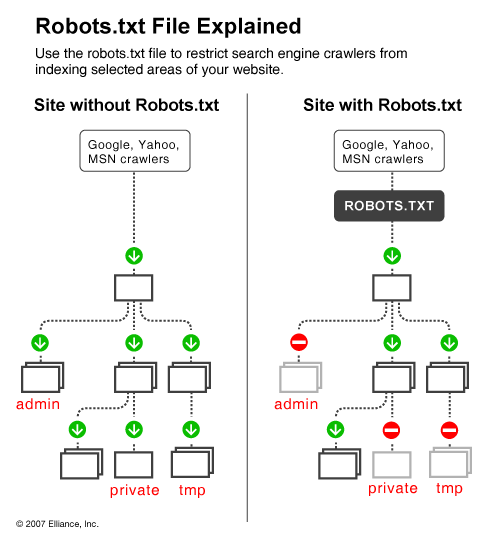
It is great when search engines frequently visit your site and index your content but often there are cases when indexing parts of your online content is not what you want. For instance, if you have two versions of a page (one for viewing in the browser and one for printing), you'd rather have the printing version excluded from crawling, otherwise you risk being imposed a duplicate content penalty. Also, if you happen to have sensitive data on your site that you do not want the world to see, you will also prefer that search engines do not index these pages (although in this case the only sure way for not indexing sensitive data is to keep it offline on a separate machine). Additionally, if you want to save some bandwidth by excluding images, stylesheets and javascript from indexing, you also need a way to tell spiders to keep away from these items.

One way to tell search engines which files and folders on your Web site to avoid is with the use of the Robots metatag. But since not all search engines read metatags, the Robots matatag can simply go unnoticed. A better way to inform search engines about your will is to use a robots.txt file.


Robots.txt is a text (not html) file you put on your site to tell search robots which pages you would like them not to visit. Robots.txt is by no means mandatory for search engines but generally search engines obey what they are asked not to do. It is important to clarify that robots.txt is not a way from preventing search engines from crawling your site and the fact that you put a robots.txt file is something like putting a note “Please, do not enter” on an unlocked door – e.g. you cannot prevent thieves from coming in but the good guys will not open to door and enter. That is why we say that if you have really sen sitive data, it is too naïve to rely on robots.txt to protect it from being indexed and displayed in search results.

The location of robots.txt is very important. It must be in the main directory because otherwise user agents (search engines) will not be able to find it – they do not search the whole site for a file named robots.txt. Instead, they look first in the main directory and if they don't find it there, they simply assume that this site does not have a robots.txt file and therefore they index everything they find along the way. So, if you don't put robots.txt in the right place, do not be surprised that search engines index your whole site.

The concept and structure of robots.txt has been developed more than a decade ago and if you are interested to learn more about it, visit or you can go straight to the Standard for Robot Exclusion because in this article we will deal only with the most important aspects of a robots.txt file. Next we will continue with the structure a robots.txt file.

Structure of a Robots.txt File

The structure of a robots.txt is pretty simple (and barely flexible) – it is an endless list of user agents and disallowed files and directories. Basically, the syntax is as follows:

User-agent:

Disallow:

“User-agent” are search engines' crawlers and disallow: lists the files and directories to be excluded from indexing. In addition to “user-agent:” and “disallow:” entries, you can include comment lines – just put the # sign at the beginning of the line:

# All user agents are disallowed to see the /temp directory.

User-agent: *

Disallow: /temp/

The Traps of a Robots.txt File

when you start making complicated files – i.e. you decide to allow different user agents access to different directories – problems can start, if you do not pay special attention to the traps of a robots.txt file. Common mistakes include typos and contradicting directives. Typos are misspelled user-agents, directories, missing colons after User-agent and Disallow, etc. Typos can be tricky to find but in some cases validation tools help.

The more serious problem is with logical errors. For instance:

User-agent: *

Disallow: /temp/

User-agent: Googlebot

Disallow: /images/

Disallow: /temp/

Disallow: /cgi-bin/

The above example is from a robots.txt that allows all agents to access everything on the site except the /temp directory. Up to here it is fine but later on there is another record that specifies more restrictive terms for Googlebot. When Googlebot starts reading robots.txt, it will see that all user agents (including Googlebot itself) are allowed to all folders except /temp/. This is enough for Googlebot to know, so it will not read the file to the end and will index everything except /temp/ - including /images/ and /cgi-bin/, which you think you have told it not to touch. You see, the structure of a robots.txt file is simple but still serious mistakes can be made easily.

Tools to Generate and Validate a Robots.txt File

Having in mind the simple syntax of a robots.txt file, you can always read it to see if everything is OK but it is much easier to use a validator, like this one: http://tool.motoricerca.info/robots-checker.phtml. These tools report about common mistakes like missing slashes or colons, which if not detected compromise your efforts. For instance, if you have typed:

user agent: *

Disallow: /temp/

this is wrong because there is no slash between “user” and “agent” and the syntax is incorrect.

In those cases, when you have a complex robots.txt file – i.e. you give different instructions to different user agents or you have a long list of directories and subdirectories to exclude, writing the file manually can be a real pain. But do not worry – there are tools that will generate the file for you. What is more, there are visual tools that allow to point and select which files and folders are to be excluded. But even if you do not feel like buying a graphical tool for robots.txt generation, there are online tools to assist you. For instance, the Server-Side Robots Generator offers a dropdown list of user agents and a text box for you to list the files you don't want indexed. Honestly, it is not much of a help, unless you want to set specific rules for different search engines because in any case it is up to you to type the list of directories but is more than nothing.


SEO Basics on Page Optimization


It takes more than just good content to get your website ranked well by search engines. Your site has probably not ranked well enough till now only because your site was not very “understandable” to the search engines. Let’s say there has been a communication gap in between the two. However, it is not an irreversible state… this is a very common problem and can easily be corrected with some ‘On-page Optimization’

1. Start with keyword research
What is keyword research? Keyword research is the practice of finding relevant search terms and phrases that people use in conducting searches online and determining the keywords most suited to your website.
So let’s start with your site, since your website targets used car buyers, what words would they type in the search engine? Note down your keywords. It probably includes ‘Buy used cars’, ‘Used cars on sale’, ‘Price of used cars’ etc.
After compiling a list of probable keywords/phrases that your target audience might use in the search engines, you can go one step further & use some great keyword research tools available online.

Every website’s coding structure is divided in to two parts: a Head and a Body. If you are thinking that I am going to teach you coding and programming, I’m not! Rather, I am just going to explain how you can tweak certain elements in each of these sections to your advantage:
The Invisible Portion
The HEAD is like a cover page of a book which gives direct information about its content. The HEAD consists of multiple tags with the Title and Meta tags being the more important ones.
• Title: The title is what appears on the top of your browser, giving brief information about the page. The title is important because the search engines use it to determine the theme & context of the site, the same way we read the title of a book to know what it’s about. For instance, if you had concluded from your keyword research that the terms ‘Used cars’ & ‘Buy used cars’ would be your target terms, your title could perhaps be ‘Buy Used Cars at Low Prices: 1000s of Used Cars for Sale’, rather than an indirect title like ‘We offer the best rides’. However, don’t overuse the keyword, we have used the terms ‘Used cars’ just twice & in proper context. A combination of keywords put together like ‘Used cars, buy cars, sell cars’ could be considered spammy.Another reason why you wouldn’t want to stuff your title with just keywords & make it user friendly is because the title is what is displayed by the search engines when showing your site in the search results.

• Meta tags:
a. Meta keywords is a tag that is no longer considered as important by the search engines but it is still considered good practice to optimize. It’s a tag which contains a list of your target key terms for that page. E.g.
b. Meta description is a brief snippet about the contents of the page that could be used by the search engine when displaying your site details in the search results. If you do not give a meta description, you have no control over what the search engines will display when showing your results.

The BODY in html consists of everything that is visible to people who open your website. Think of it like the actual content of a book with many pages. There are multiple elements in the BODY which you would want to consider tweaking.
• Headings: Heading tags (H1, H2 tags) are used to label your headline and are considered important information by search engines. Search engines assume that headings give an idea about the theme of the page and are thought to be given slightly more importance than the page content itself. It should be carefully chosen and injected with relevant keywords.
• Content: You want to make sure you include the right keywords in the contents of your page. You want to ensure you include similar words and phrases through out the content while ensuring it’s not overdone. Again, if your page targets “used cars”, you might want to distribute the keywords “used cars” through out the page while at the same time also including other similar keywords like “old cars” and “second sale cars”. Using similar keywords through out also helps. Although it’s very important to remember that while writing your content, you want to first focus on writing for your end user and making the content most appealing to them. Only once that objective is achieved, then you can try incorporating these changes in your content to suit the the search engines while ensuring you’re not compromising on the quality of the content.
Some of us also get so caught up in making our site attractive, forgetting that search engines cannot read Flash animations. So if you want to have a Flash based website, you want to make sure you also include a non-flash version for the search engines to read (some of your users as well might prefer viewing a non-flash version).

Optimizing your Internal Linking Structure: Internal linking allows users to navigate to other sections of your website. Internal linking plays a crucial role in page ranking. Use relevant anchor text, with keywords of course, to link to other pages of your website, but only if it’s relevant.
For example, if your website is offering offers on select models, you can include, “More cars for sale” instead of, “To avail offers go to: www.usedcars.com”. Clicking on ‘cars for sale’ will take them directly to the page.
• Do not leave images unattributed: Search engines can read only text, not images. By using alt attribute in your image tags, you can describe images with text, letting search engines detect images which are otherwise left ignored. When an internet user looks for images on search engines like Google image search, only websites that have textual descriptions of images will show up. For example: if you have a picture of an Audi, make sure you enter the name ‘Audi’ for the picture. The search engines might not be able to view the picture, but they will know that you have a picture of an Audi in your site through the tag.
• URLs should be informative to search engines: Uniform Resource Locator is the unique address used to locate documents on the World Wide Web. Keywords in page URL helps it to get noticed by search engines. Each page of your site has a different address called URL. For example, the URL for your website may be www.usedcars.com and the URL for its web page can be www.usedcars.com/porche/carrera.html. Avoid using random text and numbers like www.usedcars.com/wrqew11/022vds.html. This doesn’t tell search engines anything about the contents of the page. Short URLs often work best, but if it is not possible, use relevant words separated with hyphens (‘-‘).
• Stop being inactive: Update your website regularly with unique content. Don’t just update content, but keep adding more pages to your website. Search engines are looking for fresh, updated information and changes are being made by the minute on the internet.
Common mistakes you can avoid:
Now, don’t think you know how to do on-page optimization by reading the above mentioned points. You don’t want to be one of the many whose fall is caused by ignorance, no no! There are many mistakes that people make while doing on-page optimization. I have listed them below for your benefit… so that you do not make the same mistakes.
1. No space for copycats: Copying content from other websites is a no-no. It’s not only unethical but search engines can detect content duplication in a jiffy and filter it out, bringing your ranking down. Websites like www.copyscape.com help to track copied content.
2. No cheating: Hiding text using the same color as the background or placing them behind images are old tricks. You can fool visitors but not search engines. Avoid keyword stuffing, as mentioned earlier.
You probably didn’t realize that the changes you would need to make would be this simple. On-page optimization can take you a long way in getting noticed by the search engines. So if you have not implemented these changes already, do it now! You can thank me later when the search engines keep coming back to your site!


How to Increase Organic Traffic in site


Use of the Internet and accessing of websites is often referred to as traffic. When one thinks about it, this makes sense, as information is flowing back and forth across Internet roadways much like vehicles are traveling back and forth on conventional roadways. On the web, there are two main types of traffic: paid and organic. Paid traffic is precisely that: payment is made to different sources in order to direct users to a particular website. In other words, a website pays to advertise its URL or domain name.

When you get search traffic naturally from the various search engines it is called organic traffic. This is primarily done by using a technique called SEO. SEO is an acronym for search engine optimization, and there are certain, well-recognized first steps for SEO that will serve to gain you substantial organic traffic from natural searches by humans typing them into the popular engines.

It should be immediately obvious to you why gaining this organic traffic is beneficial to your site. If you want your work recognized or want visitors to your site without having to pay for advertising, the best way and most sustainable method is by the use of the popular search engine optimization steps. They should be put to use in any article, website, or blog you write. If you do not use these methods your success at capturing targeted, organic traffic from the search engines will be limited or nonexistent.

Tips For Getting Organic Traffic

1. Include relevant content, relevant to your page description and Meta keywords.
2. Instead of changing your URL or redirecting from your old URL to your new URL, follow Google's procedure on URL changes to make sure your new site doesn't get skipped, or just avoid URL changes if you can.
3. Don't post duplicate content on your site, so if you quote another page only include a small excerpt and don't repeat your own content on multiple pages.
4. Avoid flash, even though it looks cool, flash and animated banners and intros annoy visitors and search engine bots don't read them.
5. Submit to quality directories.
6. Make sure your robot.txt files are not blocking destination URLs that you do not want blocked.
7. Choose your Meta keywords wisely and include them in your content.
8. Strive to obtain quality links into your site.
9. If you use icon or image links, include a text link.
10. If you operate an affiliate site, make your site a valuable resource, so people chose your site rather than go straight to your affiliate.
11. Add a site map.
12. Don't use link schemes.
13. Write specific content, so searches can find applicable results. Instead of writing "books," write "medical text books" or "organic cookbooks"; be specific.
14. If you include low quality links on your site, block them from being scanned by Googlebot.
15. Don't break up your content too much, like loads of banner ads and so on in the middle or your text, irritates readers and bots.
16. Write unique and compelling content.
17. Don't forget to include your page descriptions.
18. Don't bury text content in images.
19. Look for un-indexed URLs, URL with more than a few parameters or dynamic links, they may be skipped.
20. Stay up-to-date on SEO, your strategies need to constantly evolve.
21. Deliver what you promise, don't drive readers to inapplicable or irrelevant pages.
22. Carefully consider your titles, make sure to include targeted keywords.
23. Don't forget humor or other devices that attract and keep readers.
24. Add text links with anchor links.
25. Keep links out and in up-to-date.
26. Start a blog or forum if it makes sense on your site.
27. Join BBB or your local Chamber of Commerce or other reputable business associations.
28. Submit articles to respectable and active article sites.
29. Add Alt tags to images for people that disable images.
30. Validate and 508 your site for accessibility.
31. Submit your business description to Wikipedia or other popular information sites.
32. Consider adding maps or mashups.
33. Submit to multiple search engines.
34. Consider marketing some of your subpages or articles that have less competition.
35. Don't forget good old-fashion PR.
36. Start a little controversy.
37. Consider adding an RSS feed.
38. Write "top ten" lists, which are popular with article search sites.
39. Build a good site that others want to link to.
40. Eliminate grammar and spelling errors.
41. Publish a privacy policy.
42. Send out press releases when it makes sense.
43. Avoid hidden text and links.
44. Keep your content up-to-date.
45. Don't employ redirects or "cloaking."
46. Don't create pages with bad content, like viruses, trojans, malware and so on.
47. Steer clear of empty, unoriginal affiliate pages.
48. Make sure every page is assessable through at least on static text link.
49. Use text, instead of images to relate important content.
50. Check for broken links.
51. Don't put too many links on one page, even if it is a resource page, keep it well under 100.
52. Test out your site with a text browser.
53. Be leery of badly placed session IDs and arguments.
54. Employ the IF-Modified-Since HTTP header to let Google know if your content has changed.
55. Don't use "&id=" as a URL parameter, they are not indexed.
56. Avoid deceptive or manipulative techniques.

what is simply SEO means???


Many may be not knowing actually what is SEO..simply it is search engine optimization,let me tel u in detail...

Search engine optimization is the process of improving the visibility of a website or a web page in search engines via the "natural" or un-paid search results. Other forms of search engine marketing (SEM) target paid listings. In general, the earlier , and more frequently a site appears in the search results list, the more visitors it will receive from the search engine. SEO may target different kinds of search, including image search, local search, video search and industry-specific vertical search engines. This gives a website web presence.

As an Internet marketing strategy, SEO considers how search engines work and what people search for. Optimizing a website may involve editing its content and HTML and associated coding to both increase its relevance to specific keywords and to remove barriers to the indexing activities of search engines. Promoting a site to increase the number of back links, or inbound links, is another SEO tactic.

The acronym "SEO" can refer to "search engine optimizers," a term adopted by an industry of consultants who carry out optimization projects on behalf of clients, and by employees who perform SEO services in-house. Search engine optimizers may offer SEO as a stand-alone service or as a part of a broader marketing campaign. Because effective SEO may require changes to the HTML source code of a site and site content, SEO tactics may be incorporated into website development and design. The term "search engine friendly" may be used to describe website designs, menus, content management systems, images, videos, shopping carts, and other elements that have been optimized for the purpose of search engine exposure.

Another class of techniques, known as black hat SEO or spamdexing, uses methods such as link farms, keyword stuffing and article spinning that degrade both the relevance of search results and the user-experience of search engines. Search engines look for sites that employ these techniques in order to remove them from their indices.